GST billing · Inventory · Accounting

Free GST billing and ERP software for Indian businesses

Make GST invoices, quotations and delivery challans, keep stock across godowns, and let the ledgers and GST reports fill in from the same entries. Sales billing, stock in one warehouse and this month's reports are free forever for the owner; Pro adds purchase bills, receipts, staff logins, orders, challans and more godowns — try it free for 7 days, then ₹1,499 per year only if you need it.

  • Free plan, free forever, no card needed
  • Try Pro free for 7 days
  • CGST, SGST and IGST worked out for you
  • Works in the browser on PC and phone
VyapRise dashboard with sales, purchases, amounts to receive and pay, a monthly sales chart and receivables ageing

304 businesses have signed up for VyapRise

  • Devi Plastic
  • Yarvix Tech
  • Free plan, forever
  • Pro at ₹1,499 per year
  • No per-user fee

One app, from the first quotation to the GST reports

VyapRise is four connected parts. An entry made in one shows up in the others, so the stock, the ledger and the GST report never disagree with the bill.

Billing & GST

GST invoices, and every document that leads to one

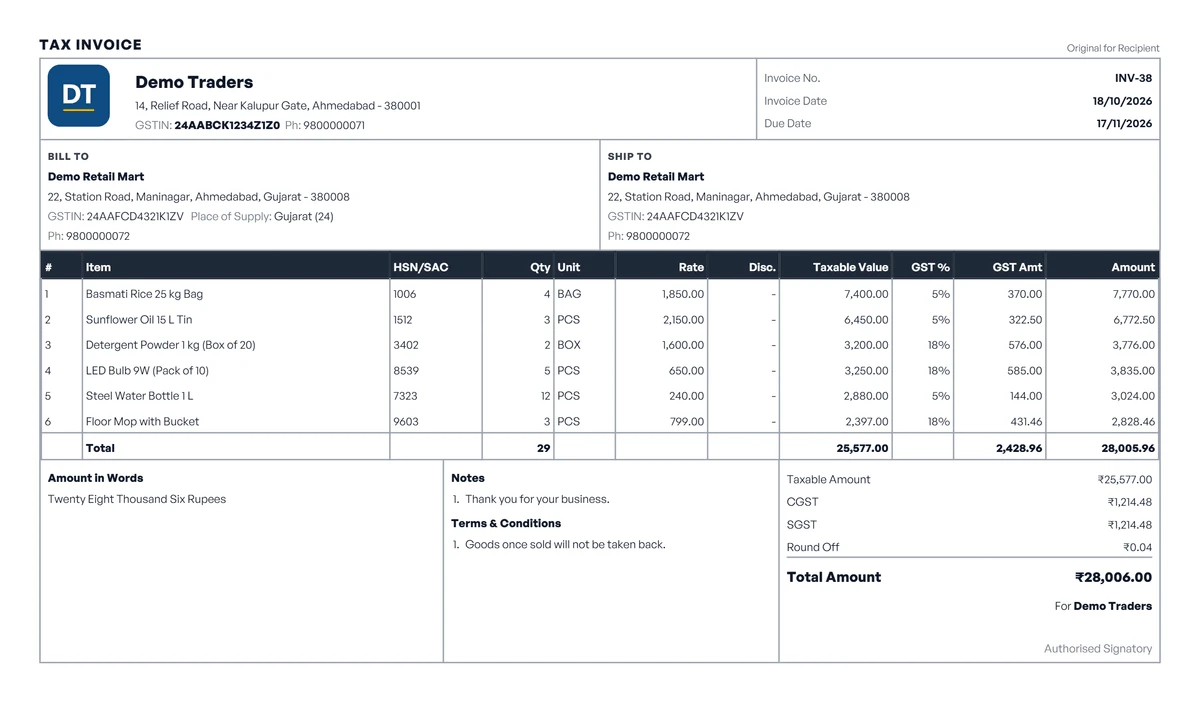
Tax invoices carry HSN/SAC codes, and the CGST + SGST or IGST split follows the place of supply. On Pro, quotations, proforma invoices, sales orders and delivery challans turn into the invoice without re-typing. Download the PDF, print it, share it on WhatsApp, email it, or copy a link the customer can open and pay from by UPI. Repeat bills can go out as recurring invoices.

  • GST invoice
  • Email & invoice link
  • Recurring invoices
  • Quotation
  • Proforma invoice
  • Sales order
  • Delivery challan
  • Credit & debit note (Pro)
  • Payment receipt (Pro)
  • Thermal print
Create a GST bill
A GST tax invoice made in VyapRise with HSN codes and the CGST and SGST split

Inventory & manufacturing

Stock that moves when the bill does

Every sale moves stock the moment it is saved, and low-stock alerts tell you what to reorder. On Pro, purchases move stock too: count stock godown by godown, take goods on consignment from suppliers, keep several warehouses, track batches with expiry dates, IMEI numbers and size × colour variants, and receive goods against purchase orders. Manufacturers on Pro book production against a bill of materials, cost labour and overhead, and send goods out for job work with the ITC-04 file.

  • Multi-warehouse stock
  • Low-stock alerts
  • Batch & expiry
  • Serial / IMEI
  • Size × colour
  • Purchase orders
  • Goods receipt (GRN)
  • Bill of materials
  • Job work
Create a purchase order
ItemMain godownShop
PVC Elbow 90° 25mmReorder at: 200604120
Sink Coupling 32mmReorder at: 10047536
Blue Storage Crate 20LReorder at: 15084560
Water Tank Lid 500LReorder at: 25Low184

Accounting & reports

Ledgers and GST reports without a second entry

Party ledgers and bank reconciliation from your bank's statement file fill in from your bills. On Pro, receipts, payment vouchers with TDS, expenses, the GSTR-1 and GSTR-3B summaries, trial balance, balance sheet and profit & loss are ready at month end to hand to your CA.

  • Party ledger
  • Receipts & vouchers
  • TDS register
  • Bank reconciliation
  • GSTR-1
  • GSTR-3B
  • GSTR-2B reconciliation
  • Balance sheet
  • Profit & loss
See all 48 reports

Party ledger

Sharma Traders

Send on WhatsApp
ParticularsBalance
Opening balance01-04-202618,500.00
Sales06-04-2026 · +14,632.0033,132.00
Receipt · UPI12-04-2026 · −20,000.0013,132.00
Sales19-04-2026 · +8,968.0022,100.00
Closing balance₹22,100.00 Dr

Billing counter (POS)

A quick counter for retail and walk-in sales

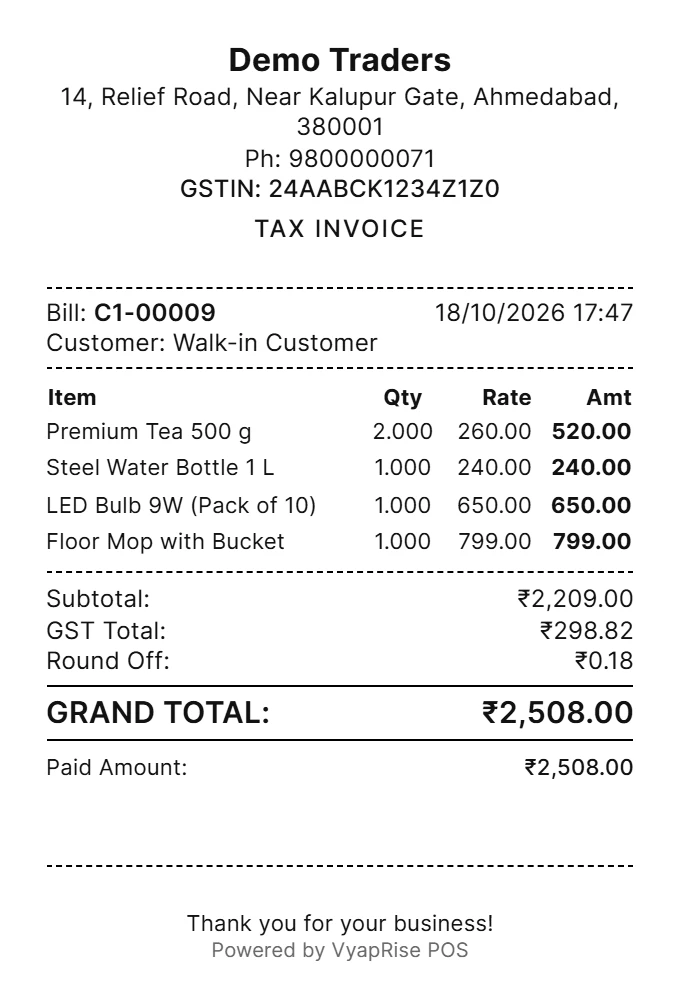
Scan a barcode or search by name, take cash, UPI or a split payment, and print the bill on 80 or 58 mm paper. Returns and exchanges are handled at the counter, and loyalty points can be switched on. Counter sales go into the same stock and the same books as everything else, so there is nothing to reconcile at closing. The POS is part of Pro.

  • Barcode scanning
  • Keyboard shortcuts
  • Hold & resume bills
  • Split payment
  • Returns & exchange
  • Loyalty points
  • Thermal receipt
About the POS
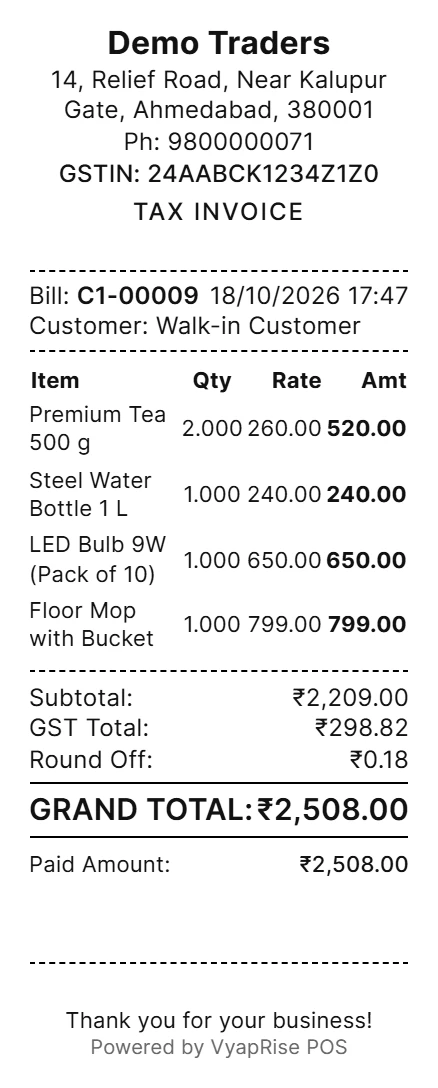
VyapRise POS billing counter with a cart, product catalogue and printed receipt

How a sale moves through VyapRise

Each document starts from the one before it, so nothing is typed twice.

  1. 01

    Quotation (Pro)

    Send the customer a price with GST shown.

  2. 02

    Sales order (Pro)

    Confirm exactly what the customer ordered.

  3. 03

    Delivery challan (Pro)

    Send the goods against the confirmed order.

  4. 04

    Tax invoice

    Bill it — the invoice number comes from your series.

  5. 05

    Payment

    Record cash, UPI or bank payment on the bill, or as a receipt on Pro.

  6. 06

    Ledger & GSTR-1

    Both are already updated (the GSTR-1 report is part of Pro). Nothing to post.

Why businesses move to VyapRise

What changes when you move over from Excel, a desktop package, or a billing app priced per user.

  • A Free plan that stays free

    Sales billing, stock in one warehouse and this month's reports cost ₹0, forever, for the owner (10 sales invoices a month, 30 items, 10 customers). Pro adds purchase bills, receipts, staff logins, orders and challans, more godowns, manufacturing, POS, full accounting and GST reports for ₹1,499 per year.

  • Everyone gets their own login

    On Pro, give the counter, the godown and your accountant separate accounts, each seeing only what their role allows — with no per-user fee.

  • Bills go out on WhatsApp or email

    Share an invoice PDF on WhatsApp, email it, or send a link the customer can pay from by UPI. The customer's balance can go to them on WhatsApp from the ledger too; statement PDFs and automatic reminder emails are part of Pro.

  • Bring your data with you

    Import items, customers, suppliers and opening balances from Excel. Excel exports from Vyapar and myBillBook are read with their own column names, and customers' unpaid invoices come in as opening bills.

  • Office and phone

    Work in any browser at the office, and in your phone's browser when you are out — add it to the home screen like an app.

  • Your own backup

    Your books are kept on cloud servers, and the owner can download a full backup of the company at any time. There is nothing to install.

Start free. Upgrade to Pro only when you need it

Sales billing, stock in one warehouse and this month's reports are free forever for the owner. Pro adds purchase bills, receipts, staff users, quotations, orders and challans, multiple warehouses, manufacturing, POS, full accounting and GST reports — try it free for 7 days, then ₹1,499 per year only if you need it.

Every new company can try Pro free for 7 days — no card needed. When the trial ends you stay on the Free plan, which is free forever.

Free

Sales billing for an owner-run business that is just starting.

₹0forever

Up to 10 sales invoices a month per company

Start free

No card needed · Free forever

Included in Free

  • Sales invoices — 10 per month per company
  • Up to 30 items and 10 customers
  • Suppliers — unlimited
  • Stock in one warehouse, updated by every sale
  • Payments recorded on the invoice
  • Bank accounts
  • Sales and stock reports for the current month
  • Invoice printing templates — bills in English, Hindi or Gujarati
  • Share invoices on WhatsApp
  • Bulk import from Excel
  • Audit log of who changed what
  • A daily summary email of your sales, money due and low stock
  • One user — the owner

Pro

Save 25%

Everything in Free, plus unlimited items and customers, purchase and stock, receipts and payments, staff users, orders and challans, manufacturing, POS, full accounting and GST reports.

₹1,499per yearRegular price ₹1,999

Just ₹4.11 a day · Save 25%

Try Pro free

One-time yearly payment · No auto-renewal

Everything in Free, plus

  • Unlimited sales invoices — no usage caps
  • Unlimited items and customers
  • Purchase bills, stock in/out, transfers and stock counts
  • Receipts, payments, credit and debit notes
  • Reports for any period, with PDF and Excel download
  • Staff users, roles and permissions
  • Quotations, proforma invoices, sales orders and delivery challans
  • Purchase orders, requisitions, GRN and purchase returns
  • More than one warehouse
  • Customer price lists
  • Batch & expiry dates, serial/IMEI numbers, variants and kits
  • Barcode label printing
  • Automatic payment reminders, and invoice and receipt emails
  • Send invoices on WhatsApp in one press (20 a day)
  • Goods with dealers on sale or return
  • AI connector for ChatGPT and Claude
  • Bill of materials (BOM)
  • Production plans and production orders
  • Job cards and quality checks
  • POS billing, sessions and terminals
  • GSTR-2B reconciliation
  • Chart of accounts
  • Expenses and expense reports
  • Cost centres and cost-centre P&L
  • Tally export
  • Profit & loss, balance sheet and trial balance
  • Cash flow and day book
  • GSTR-1, GSTR-3B and HSN summary reports
  • GST filing desk: due dates, check before filing, Send to CA
  • Bank ledger report
  • No "Powered by VyapRise" line on printed invoices

Before you pay, read: Refund & Cancellation Policy · Terms of Service · Shipping & Delivery Policy

From a business that runs on it

VyapRise has completely transformed how we manage our manufacturing business. From real-time inventory tracking to seamless GST billing, it's the most powerful and intuitive ERP we've ever used. It truly understands the needs of Indian entrepreneurs.

Devi Plastic Industries

Managing Director, Devi Plastic

VyapRise vs Tally vs Vyapar, side by side

Price, limits and setup, compared on the points buyers ask about first. Competitor details are from their public plans and may change.

Comparison ParametersVyapRise ERPVyapar Appper their websiteTally Primeper their website
PriceFree plan forever; Pro ₹1,499/yearFree plan on mobile; paid plans for morePaid licence: Silver or Gold, lifetime or rental
Invoice limit10 a month on Free; unlimited on ProVaries by planNo invoice limit on a paid licence
UsersFree: the owner only; Pro: unlimited users with roles, no per-user chargeVaries by planSilver: one user; Gold: several on one network
Where it runsAny browser on PC or phone; needs internetApps for Android, iOS, Windows and Mac; works offlineWindows desktop; cloud access is a separate service
GodownsOne godown on Free; multiple godowns and transfers on ProGodowns and stock transferUnlimited godowns
ManufacturingBOM, production orders, job cards, QC (Pro)Manufacturing (raw material to finished goods)Bill of materials and manufacturing journal

Vyapar and Tally details are as stated on their own websites on 3 October 2026; we have not tested them ourselves. Their plans change, so check their sites for current details.

Detailed comparison:VyapRise vs Tally →VyapRise vs Vyapar →

Questions people ask before signing up

Anything else, write to [email protected] and a person will reply.

Is VyapRise free?

Yes. The Free plan is free forever, with no card needed. It covers sales billing for one user (the owner): up to 10 sales invoices a month per company, 30 items and 10 customers, stock in one warehouse and reports for the current month. Pro, at ₹1,499 per year, adds unlimited invoices, items and customers, purchase bills, receipts and payments, staff users, quotations, orders and challans, more warehouses, manufacturing, POS, full accounting and GST reports, and every new company can try Pro free for 7 days first.

Does it support manufacturing and production?

Yes. VyapRise covers the bill of materials (multi-level, with stages), production plans drawn from your sale orders, production orders, job cards, quality checks, job work with ITC-04, and costing with labour, machine hours and overhead, next to a machines master and raw material stock. Manufacturing is part of the Pro plan, and every new company can try Pro free for 7 days.

Can I manage my logistics and vehicles?

Partly. You can keep a list of your vehicles and put the vehicle number and transport details on invoices (and, on Pro, delivery challans). From saved invoices you can print a dispatch load sheet per vehicle or route, and on Pro VyapRise prepares the e-way bill bulk-upload file for the portal; transporters on Pro can also make lorry receipts (LR / bilty) and bill their freight. It does not generate e-way bill numbers, trip sheets, driver schedules or transport reports.

Can I manage multiple bank accounts and reconcile ledgers?

Yes. Add each bank account, record its transactions, and on the bank reconciliation screen mark each entry cleared as it appears on your bank statement, or import the statement (CSV, XLS or XLSX) and match its lines to your entries. On Pro, receipts and payments you record against bills land in the right bank account; on Free, a payment is recorded on the invoice itself. The cash flow report is part of Pro.

What kind of business reports can I generate?

Over 40 reports, including stock summary and movement, the sales register, party ledgers and receivables ageing (current month on Free), and on Pro the purchase register, GSTR-1, GSTR-3B, profit & loss and balance sheet. On the Free plan, reports show on screen for the current month; Pro covers any period and exports to PDF, Excel and CSV.

Can I migrate my data from my existing software?

Yes. Export items, customers and suppliers to Excel or CSV from your old software, then import the file into VyapRise: you map the columns and see a preview before anything is saved. Excel exports from Vyapar and myBillBook are recognised, so their columns are matched for you. Full invoice history is not imported, but each customer's unpaid invoices can come in as opening bills to collect against; other balances come forward as opening balances.

What is GST billing software?

GST billing software is a program that issues a tax invoice in the form Indian GST law requires — your GSTIN and the buyer's, an unbroken invoice series, an HSN or SAC code on every line, and the tax shown separately as CGST and SGST, or as IGST. Getting that format right once in Excel is easy. Keeping it right across a few hundred invoices a month, while the same figures also have to reach your stock register and your GSTR-1, is where doing it by hand stops being practical.

VyapRise is that job done in a browser. You enter the bill once, and the same entry updates the customer's ledger, takes the goods out of stock, posts the revenue and the tax to the right accounting heads, and turns up in the GST report at the end of the month. Nothing gets re-typed, so there is no second system to reconcile against when the two disagree.

It runs on what you already own. No installation, no Windows requirement, no licence per computer — the billing counter, the accountant's laptop and your phone all open the same live data. The Free plan stays ₹0 for the owner, and Pro is ₹1,499 per year with no per-user charge, so the cost does not change as the team grows.

What a GST tax invoice has to carry

Rule 46 of the CGST Rules sets the fields. VyapRise fills most of them from your company profile and your item master, so they cannot be left off by accident — but it is worth knowing what the department is actually looking for.

FieldWhy it matters
Supplier GSTIN, name and addressHeld in your company profile and printed on every document, so it cannot come out differently on two invoices.
Consecutive invoice numberOne unbroken series per financial year, up to 16 characters. VyapRise allocates the next number inside the save itself, so two people billing at the same moment cannot take the same one.
Date of issueFixes the tax period the invoice falls in, which is what decides the GSTR-1 it appears in.
Buyer name, address and GSTINKept once against the customer. For an unregistered buyer billed ₹50,000 or more, the delivery address and state code are required as well.
HSN or SAC codeStored on the item, not typed per line. How many digits you must show depends on your turnover, so it is set once in settings.
Description, quantity and unitThe line detail. The unit matters twice over, because it is also what your stock register moves in.
Taxable value after discountA discount given at the time of supply reduces the taxable value. Applying it after tax instead is the most common reason a return stops agreeing with the books.
Rate and amount of taxCGST and SGST for a supply inside your state, IGST for one outside it, plus cess where it applies. Worked out line by line from the rate on the item.
Place of supply, with state nameThis is what decides whether the tax splits in two or goes out as a single IGST line.
Signature or digital signatureA scanned signature or a digital one, with the declaration that goes under it.

CGST, SGST or IGST — which one applies

One question settles it: is the place of supply in the same state you are registered in?

Same state — CGST + SGST

A ₹10,000 sale at 18% within Gujarat is ₹900 CGST and ₹900 SGST. Half goes to the Centre and half to the state, and the two halves stay separate — separate lines on the invoice, separate ledgers in your books, separate columns in the return.

Different state — IGST

The same ₹10,000 sale at 18% to a buyer in Maharashtra is ₹1,800 of IGST on one line. VyapRise reads the buyer's state from their GSTIN and switches the split itself, so a Maharashtra customer never ends up with a CGST invoice by mistake.

The place of supply is not always the buyer's registered address — for some services it is where the work is performed, and for goods it is where the movement ends. Where the two differ, set the place of supply on the invoice and the tax follows it.

The businesses this was built for

VyapRise was written inside a working plastics manufacturing business, which is why the modules cover a full order-to-cash cycle rather than billing on its own. Each trade now has its own setup: pick a business type and the menus and item form fit it.

Traders and distributors

Quotation, sales order, delivery challan, invoice and receipt in one chain on Pro, each carrying forward from the one before it. Dispatch load sheets per vehicle or route are on every plan.

Create a sales challan

Manufacturers

Bill of materials, production planning and raw-material consumption on Pro, with labour and overhead in the cost, scrap booked back into stock, and job work challans with the ITC-04 file.

Manufacturing software

Retail counters and shops

Barcode scanning, split cash and UPI payments, returns and exchange at the counter, loyalty points and end-of-shift totals on a keyboard-driven POS screen (Pro).

POS billing software

Wholesalers

Credit periods with due dates, invoice-wise ageing, post-dated cheques (Pro) and customer follow-ups — including a WhatsApp reminder sent straight from the ledger.

Customer ledger and outstanding

Service businesses

SAC codes in place of HSN, hours and expenses logged per client and billed on one invoice, and repair job cards that fill the bill. Quotations and proforma invoices are on Pro.

Free quotation generator

Chemist shops and pharmacies

Search by salt, prescription details and a Schedule H1 register, and drug licence numbers on the bill. On Pro, batches go out earliest expiry first and expired stock is never picked.

Medical store billing software

Pharma distributors

The buyer's drug licence on the invoice, and dispatch load sheets. On Pro, a brand claims register for scheme, price and expiry claims, and expired batches go back to the supplier as a ready purchase return.

Distributor billing software

Garments and footwear

A GST rate that switches with the piece price. On Pro, take stock on consignment from suppliers, enter a style's sizes and colours in one grid and see stock by size.

Garment shop billing software

Mobile and electronics shops

Repair job cards, EMI through a finance company and old-phone exchange on the invoice. On Pro, each IMEI is tracked from purchase to sale, with the warranty printed on the bill.

Mobile shop billing software

From signing up to your first GST bill

Five steps, and none of them need a consultant or a training session.

  1. 1

    Create an account

    An email address and a password. No credit card, and no sales call standing between you and the software.

  2. 2

    Fill in the company profile

    GSTIN, address, state and bank details. This is what prints in the invoice header, and you enter it once rather than per bill.

  3. 3

    Import items and parties

    An Excel sheet of your items, customers and suppliers, opening balances included. The import maps your column names onto the fields, so the sheet does not have to be rebuilt first — Excel exports from Vyapar and myBillBook are matched automatically.

  4. 4

    Raise the first invoice

    Pick the customer, add the lines, and the tax splits itself from their state and the rate on each item. Download the PDF or share it on WhatsApp from the same screen.

  5. 5

    Check that it reached the reports

    It already has. The invoice is in the customer's ledger, out of the stock register, and in the GSTR-1 working (the GSTR-1 report is part of Pro) — there is no separate posting step to remember.

Moving over from Tally, Excel, another billing app or a paper book

Nobody starts from nothing. What matters is how much of the old records you actually have to carry across, and the answer is usually less than people expect.

From Tally

Masters and balances come across by Excel import, and the ledger structure maps onto the same heads you already work in, so the trial balance is recognisable from day one.

VyapRise compared with Tally

From Excel or a billing app

Your sheet is usually already close to the import format — one row per item or per party, with the opening balance in a column of its own. Excel exports from Vyapar and myBillBook are read with their own column names. Most migrations are a morning's work.

From a paper book

Start with the parties who still owe you and enter what they owe as an opening balance. Bills that are already closed do not need to be entered at all.

Old invoices already filed stay where they are. You are moving the balances forward, not re-keying history. A customer's unpaid invoices can come in one by one as opening bills, so payments can be set against them, without booking any tax or stock again — and if a figure needs correcting later, the audit trail records who changed it and when.

Guides on this topic

Plain-language explainers, written in Hindi.

Free tools you can use right now

Every tool below runs in the browser with no account and no download. They write to the same data as the full ERP, so a quotation made here becomes an invoice later without being retyped.

Make your first GST invoice today

Sign up, add your GSTIN and business details, and the first bill can go out in a few minutes.

Free plan forever · Pro free for 7 days · No card needed